How does Keep detect that an account is at risk?+
Every day Keep looks at each account's usage and what it pays. An account becomes at risk for an explicit reason: usage dropped (the last week fell below half of the one before), it has been inactive for longer than is normal for your base (a threshold learned from your users' rhythm, between 3 and 30 days, adjustable), it had no activity in 30 days, or it shows no visible usage and no recorded contact in the CRM. Usage is summed per company, so colleagues count. There is no machine-learning score: every at-risk account comes with its reason in words.
What is “revenue at risk”?+
The current MRR of the accounts at risk right now, each account counted once, per currency — never converted. The Overview shows that number, how much of it renews in the next 7 days, and the accounts ranked by urgency: Urgent means paying and renewing within 7 days; then High, Medium and Low.
Does Keep change anything in my billing?+
No. Keep reads subscriptions, invoices and plan changes and never creates, changes or cancels anything. With Stripe the connection goes through Stripe Connect — Stripe only offers a read-and-write permission, and Keep only ever reads. With AbacatePay and Asaas it's an API key, stored encrypted.
Where does product usage come from?+
From PostHog (a read-only OAuth connection) or from Keep's Activity API, which takes events from your backend. Each event is matched to the paying account by stripeCustomerId, email or company domain. If you send the feature field, Keep can also tell which feature an account stopped using.
Can I run NPS inside my SaaS?+
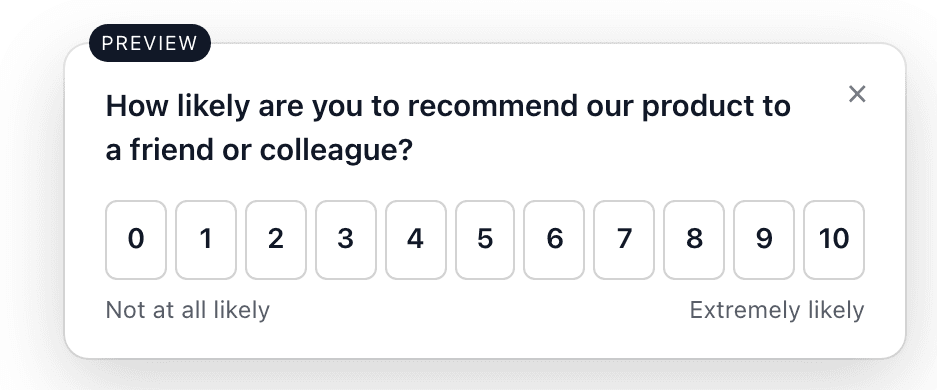
Yes. You build the survey — NPS, CSAT, CES or custom — in the builder, with a live preview, and install Keep's widget with a snippet. It loads asynchronously (~8 KB), runs in Shadow DOM, works with strict CSP and uses no cookies. You choose the audience (everyone, identified users, new users, plans or companies) and the trigger (immediately, after a delay, after page views, manually or on an event).
How does feedback connect to revenue?+
Every answer sits next to the MRR, risk and renewal of the respondent's account. An NPS 3 from a $3,240/month account renewing in 4 days calls for a different action than an NPS 3 from a healthy account. Insights show revenue by answer type (each account counted once) and your highest-MRR detractors. Keep shows the facts side by side and never claims one caused the other.
Can I announce new features inside my product?+
Yes. You write the update in Keep — New feature, Improvement, Announcement or Maintenance, with an optional button to an https link — and move it from draft to published to archived. It runs on the same keep.js snippet as the surveys: Keep.init with your workspace's public key and updates: true, and any element with data-keep-updates (or Keep.showUpdates()) opens the panel. The audience — everyone, identified users, certain plans or certain companies — is decided on Keep's server from what your app passes to Keep.identify. Each update can have an image (PNG, JPG, WebP or GIF, up to 2 MB, served by Keep itself, with required alt text) and reactions — 😞 😐 😍, read as negative, neutral and positive sentiment, or 👍 ❤️ 🎉 🔥 👀; one per person, and viewers never see counts. For each update you see unique views, unique clicks, CTR and the reactions, and when a person is matched to an account, Customer 360 shows it in the account's activity. A click is counted as a click: Keep doesn't report it as adoption of the feature.
Which tools does Keep integrate with?+
Revenue: Stripe, AbacatePay and Asaas. Usage: PostHog and Keep's Activity API. CRM and support: HubSpot and Intercom. Alerts: Slack and email. Action: Linear, with two-way sync. Feedback: Keep's own survey widget.
How does Keep measure recovery?+
Keep records each account's risk state every day. An account is recovered when it leaves risk and is still paying — a cancellation never counts, and neither does closing an issue. The Recovery screen shows recovered MRR, recovered accounts, average time to recover and, once there are enough ended episodes, the recovery rate. History starts when you connect.
Does Keep replace my CRM or Linear?+
No. HubSpot stays your CRM and Linear stays where the team works. Keep reads the account owner, stage and last contact from HubSpot and syncs issues with Linear both ways. Its job is to bring the signals together around retention, not to become one more place to maintain.
What data does Keep store?+
Customers and subscriptions from your billing (name, email, MRR, plan and change history), activity days per user and company, survey answers (score, comment and, when identified, the respondent's email), views and clicks on your product updates, risk cases and history, issues, playbooks and your conversations with the agent. Integration secrets are encrypted. You can export everything as JSON or delete your account at any time, and the subprocessor list is public.
How much does it cost, and how do refunds work?+
Pricing follows the MRR Keep monitors, and every plan has the whole product — the table above shows the amounts. There is no free trial: you connect, see the first scan with your own at-risk accounts, and only then choose a plan. If it isn't a fit, there's a 14-day money-back guarantee, and you cancel from the dashboard.